Advanced BMR Calculator
- Settings
What is BMR?
BMR (Basal Metabolic Rate) is the number of calories your body needs at rest to maintain vital functions.
How It Works
This calculator supports multiple scientific formulas including Mifflin-St Jeor, Harris-Benedict, and Katch-McArdle.
How to Use
- Enter your age (15–80)
- Select gender
- Enter height and weight
- Optionally enter body fat %
- Choose formula and unit
- Click Calculate
How to Use a BMR Calculator to Master Your Fitness Goals
Ever wonder how many calories your body burns if you spent the entire day binge-watching your favorite show? That baseline number is your Basal Metabolic Rate (BMR). It is the energy your body requires simply to keep you alive—breathing, circulating blood, and regulating temperature.
To skip the complex mathematical equations, a modern BMR calculator is your best shortcut. Here is a straightforward, step-by-step guide on how to use it to take control of your nutrition and fitness.
Step 1: Gather Your Vital Metrics
Before you click “Calculate,” you need a few personal metrics ready. A standard, premium BMR calculator relies on highly validated formulas (like the Mifflin-St Jeor or Harris-Benedict equations) which require four simple inputs:
- Age: Your metabolism naturally shifts as you get older, so accuracy here matters.
- Gender: Biological sex influences muscle mass ratios, which impacts your baseline calorie burn.
- Height: Inputted in either centimeters (cm) or feet/inches (ft).
- Weight: Inputted in kilograms (kg) or pounds (lbs).
Step 2: Input Your Data into the Calculator
Once you are looking at the user interface, entering your data is incredibly intuitive:
- Select your Gender.
- Type in your current Age.
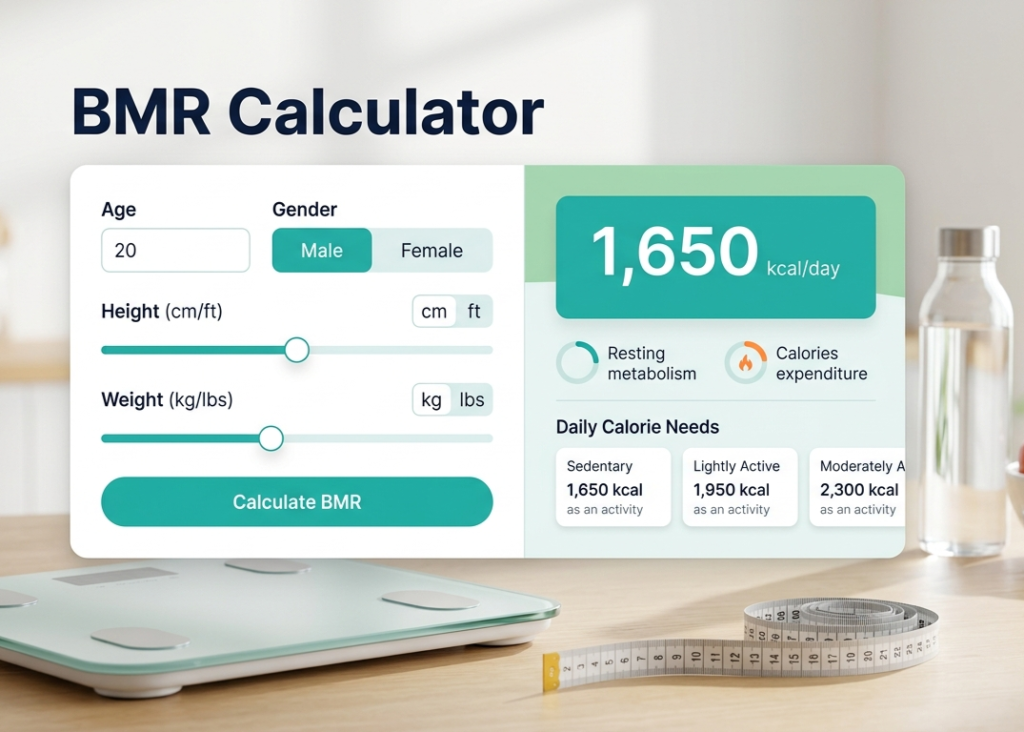
- Use the sliders or text fields to adjust your Height and Weight. Make sure you toggle the correct unit system (metric vs. imperial) so you don’t accidentally tell the calculator you weigh 150 kilograms instead of 150 pounds!
- Click Calculate BMR.
Step 3: Analyze and Interpret Your Results
Understanding Your Resting Metabolism
Once calculated, your primary result will display a specific number—for example, 1,650 kcal/day. This is your resting metabolism.
Important Note: Never eat below your BMR number without direct medical supervision. Your body needs these exact calories just to keep your vital organs functioning properly.
Factoring in Your Daily Calorie Needs
A premium BMR calculator does not just stop at your resting rate; it also provides your Total Daily Energy Expenditure (TDEE) based on various activity levels. This gives you a realistic snapshot of your actual daily burn:
| Activity Level | Description | Estimated Calorie Need Example |
| Sedentary | Little to no exercise, desk job | 1,650 kcal |
| Lightly Active | Light exercise 1–3 days/week | 1,950 kcal |
| Moderately Active | Moderate exercise 3–5 days/week | 2,300 kcal |
Step 4: Map Your Results to Your Fitness Goals
Now that you have your baseline data from the BMR calculator, you can use it to build a flawless nutritional strategy:
- For Weight Loss: Create a safe caloric deficit by consuming roughly 300 to 500 calories less than your TDEE (activity level total), ensuring you stay above your baseline BMR.
- For Muscle Gain: Create a caloric surplus by eating 300 to 500 calories more than your TDEE while pairing your diet with resistance training.
- For Weight Maintenance: Eat exactly what your active lifestyle tier requires.
By using a BMR calculator as the foundation of your health journey, you eliminate the guesswork and replace it with data-driven results.
- More Calculators
- BMR Calculator